


Manage settings
Manage special days
Define exception periods for Club-House closures
Special days let you flag periods to your system during which your club is not available. This includes school holidays, annual leave, public holidays, or any other period when your facilities are closed. Correctly defining these special days ensures the calendar and booking management work properly.
Access special days management
From your admin dashboard, navigate to Settings, then select Manage special days.
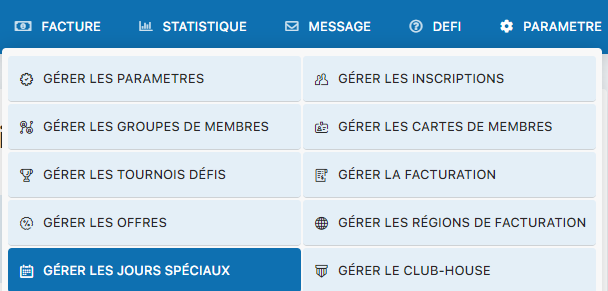
Menu for accessing special days management
Activate the special days system
To use special days, you must first activate this module. Select Yes for the “Use special days” option:
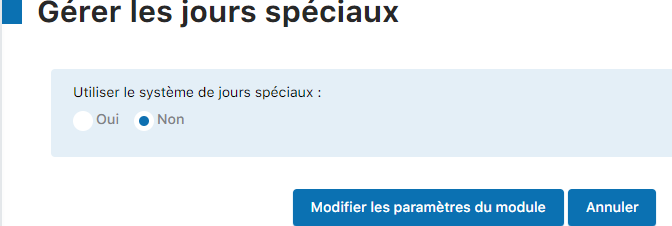
Selecting Yes to activate special days
Enter your special days
Access the calendar or the form to enter your special days. Click the date or fill in the form for each closure period:
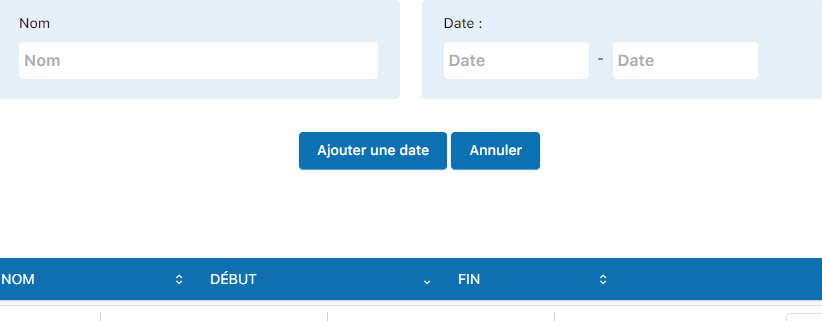
Calendar for entering special days and periods
Types of special days to configure:
- School holidays : Summer holidays, autumn holidays, Christmas holidays, winter holidays, spring holidays
- Public holidays : National holidays, religious holidays, and other public holidays important to your region
- Exceptional closures : Closures for maintenance, special events, or other administrative reasons
- Rotation periods : Closure of specific facilities for maintenance or renovation
Configuration tips:
- Enter the exact dates from the first to the last day of the closure period
- Give each period a descriptive name (e.g. “Summer holidays 2026”)
- Check that all closure periods are properly marked
- Regularly update the calendar according to the school calendar and your club's events
💡 Tip: Plan your special days calendar well in advance. This lets members immediately see the closure periods and avoids confusion. Feel free to share this calendar with your members via your website or newsletters.
Plugin.ch Tutorial — Manage settings